
Quality of Life
Vehicles
Zombie Land runs two separate vehicle systems: personal licensed vehicles you buy, spawn, and recall with commands, and normal world vehicles you find on the map and claim with a lock. Knowing which is which saves you fuel, scrap, and heartbreak.
Two Systems, Do Not Mix Them Up
- Licensed vehicles: personal vehicles you buy through the vehicle system. You spawn and recall them with commands. These do not decay while they are out.
- World vehicles: normal vanilla vehicles found on the map or bought at vendors. These use vanilla decay rates. You can claim them with /lock (see below).
Licensed Vehicles
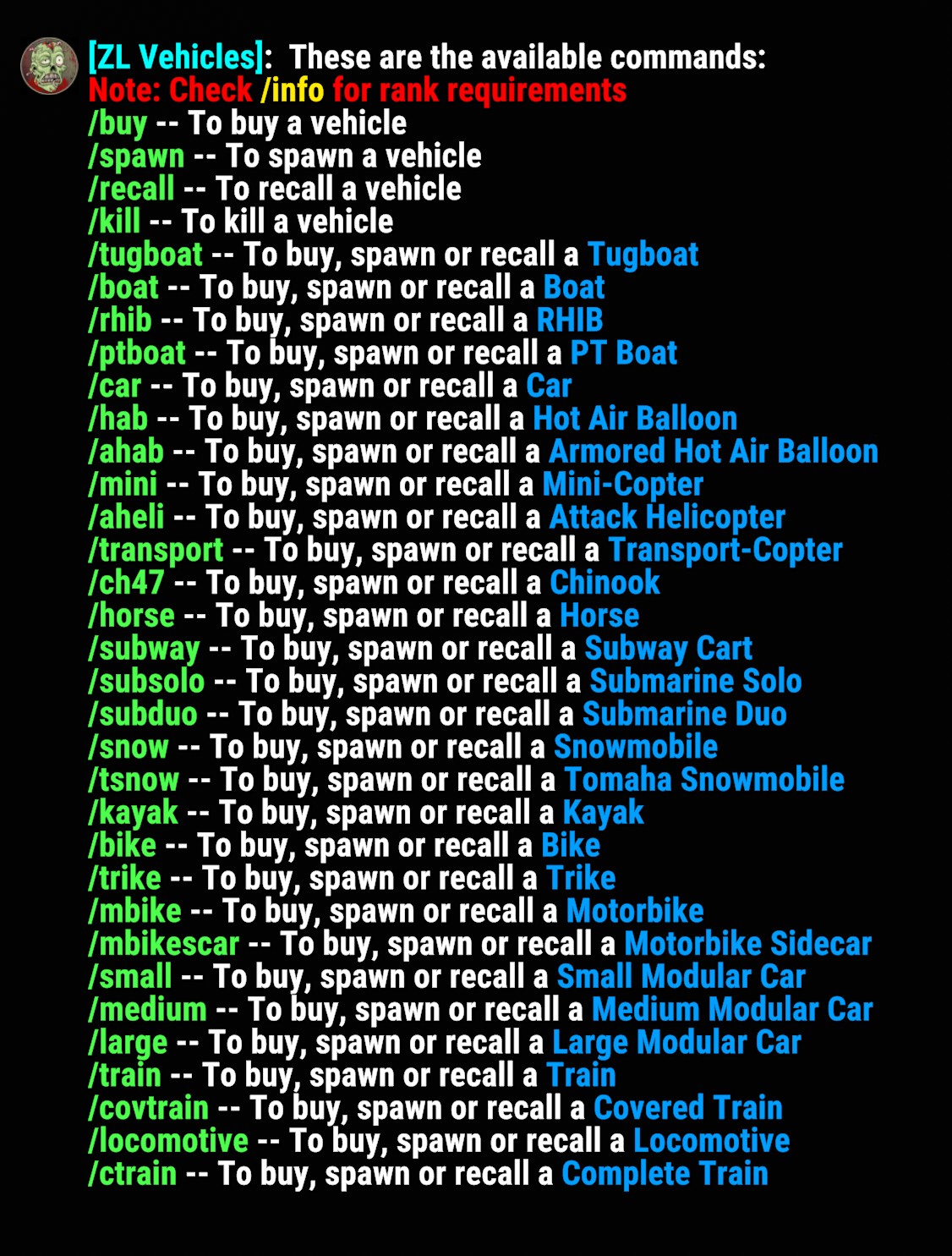
Use /license for a chat list of available vehicle types and commands. Type /buy with no arguments for the purchasable list, or /buy vehicle to purchase one.
Licenses do wipe on map wipe. Some vehicles also lose their license if they are destroyed in the world (blown up, crashed, and so on). Putting a vehicle away with /kill does not remove the license.
Spawning, Recalling, and Storing
Core Commands
Works on any licensed typeMost vehicles also have a short alias that buys, spawns, or recalls depending on your current state. For example, /mini will buy a minicopter if you do not own one yet, spawn it if you own it and it is stored, or recall it if it is already out. Other examples: /boat, /rhib, /transport, /horse. Run /license for the full alias list.
Losing a License
If a licensed vehicle is destroyed in the world (explosion, crash, and so on), some types remove your license and others do not. Types that currently lose the license on destruction:
- Mini-Copter
- Attack Helicopter
- Transport-Copter
- Subway Cart and Train / Covered Train
- Submarine Solo and Submarine Duo
Other licensed types keep the license after a destruction so you can re-spawn. Using /kill always keeps the license. Refunds of fuel or inventory on store vs crash also vary by vehicle; check in-game chat when it happens.
Team Sharing
Clan and team members can use your licensed vehicles with you. Players outside your clan or team cannot take the driver's seat or loot fuel / inventory on your licensed vehicles.
World Vehicles & Locking
World-spawned vehicles are separate from licensed ones. They use vanilla decay. Do not expect the no-decay behavior that licensed vehicles get.
When you sit in an unowned world vehicle, chat will tell you how to claim it. Use /lock while sitting in it to lock it to yourself. Use /unlock from the driver's seat (or while looking at it nearby) to release it. Licensed vehicles cannot be locked or unlocked this way; they are already owned through the license system.
There is a limit on how many world vehicles of each type you can lock at once. Higher ranks get higher limits.
Command Quick Reference
Everything In One Place
/license shows the full alias list in-gameVehicle perks and lock limits by rank are listed on each rank page. Questions? Ask in Discord.