
Economy
Trade
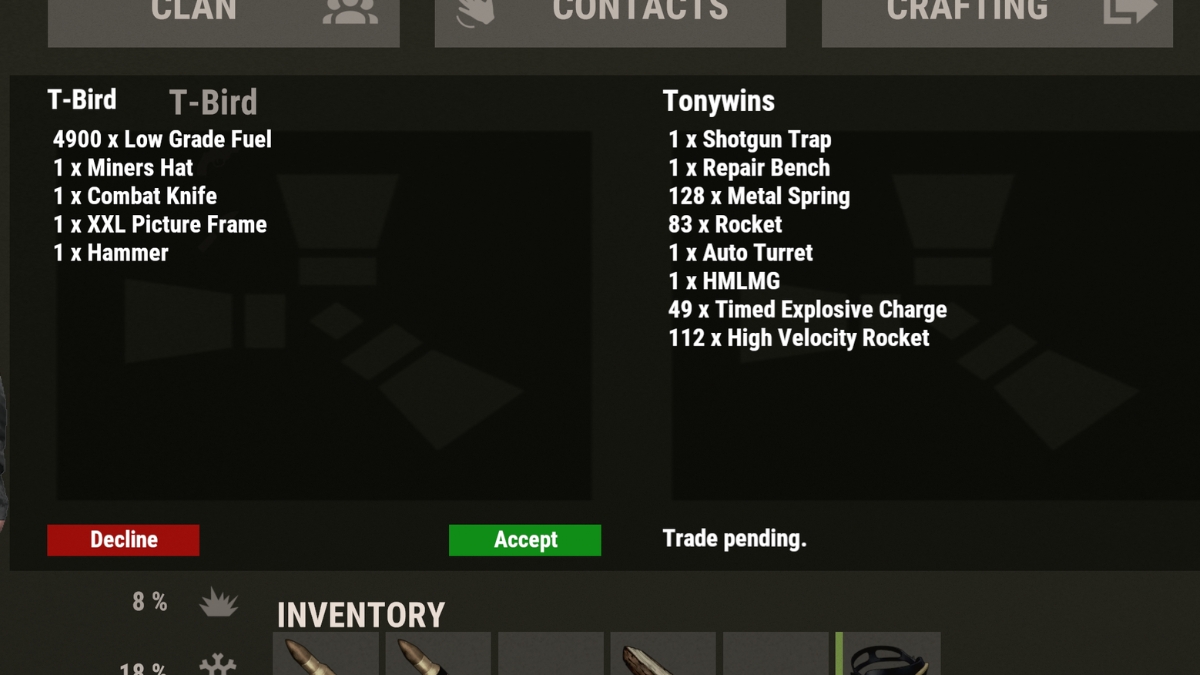
Securely exchange items with another player face-to-face. Both sides see exactly what is being offered before anything is swapped. No more dropping loot on the ground and hoping for the best.
How To Trade
- Send a trade request: /trade playername
- They have 25 seconds to accept with /trade accept before the request expires automatically
- Both players see a trade window. Place the items you are offering on your side. Either side can decline from that window if they change their mind
- When both sides are satisfied, both must confirm; the swap happens simultaneously
Neither player receives anything until both have confirmed. If either side cancels at any point before confirmation, both get their items back. After a completed trade, both players have a 1 minute cooldown before they can trade again.
Restrictions
Bound legendaries cannot be traded. Legendary items are permanently bound to their owner and will not transfer. Components and component boxes that are bound follow the same rule. See Legendary Items for details.
- You cannot trade while swimming, falling, mounted, wounded, or riding in a boat, hot air balloon, or lift.
- If a trade seems stuck after both sides confirm, make sure both players have free inventory space to receive the incoming items.
Command Quick Reference
Trade Commands
Both players need to be close by/trade playernameSend a trade request
/trade acceptAccept an incoming trade request
Want to sell instead of swap? Check the in-game shop and player market pages. Questions? Ask in Discord.