
The Archive
FAQ
Straight answers to the questions our admins hear every day. Search it, browse it by category, and if you come up empty, ask in Discord.
Most asked
Start Here
Three questions that account for more tickets than the rest of this page combined.
Someone stole my stuff
What counts as proof, why we require it, and how to get it without lifting a finger mid-fight.
Why is my base gone?
Decay, upkeep, building rules, or wipe day. The four ways a base disappears, explained.
What are the upkeep rates?
How much your base costs to keep standing on this server, straight from the config.
Players
A player stole my loot/crate/NPCs how do I report them?
The first question and most important question is: did you get proof? A video or screen shot showing the actions, etc. Did you get anything?
If not, please do not submit a ticket as Rust does not log any of these interactions (looting, door opening, picking up, etc.).
This is not optional, this is not us being lazy, and this is not something that we can just "take your word for it" or "come on you guys know me". We require some form of proof otherwise everyone could just submit tickets for free stuff because "someone stole this from me" constantly. If we give one single handmade shell back to a person who had no proof, then we must give every player everything they claim was stolen from them to be fair administrators. And we obviously are not going to do that.
So in the name of fairness, we require proof. We have links to multiple recording software options in our links section. These do not just "record you playing" but instead provide you with a hotkey that allows you to save video clips of things that already happened (for example you can set it to 'save the last 90 seconds'). These have no impact on performance, and can run on a laptop while playing Rust which is hard enough as it is. And you will experience no impact.
Screen shot proof must include, without any shadow of a doubt, what happened and who did it. Just showing us a player near you or in the same monument as you is not proof. It has to be unquestionable that this person took something you earned (ie. you can literally see him rush up to some NPCs you just killed and take the loot right there in front of you).
One final form of proof is admin eyes. If the issue is ongoing, or you think the player will do it again, get an admin in game to invisibly observe. If an admin witnesses it, that counts as proof.
Can players steal my horse / minicopter / boat?
It depends on the vehicle type. See the Vehicles guide for full details.
World vehicles (found on the map or bought at vendors with scrap) can be claimed - when you sit in an unowned one, chat will tell you how. Use /lock while seated to claim it; use /unlock from the driver's seat (or while looking at it nearby) to release it. Unclaimed world vehicles can be stolen; if someone takes a locked one, that is against our rules - get a recording and submit a support ticket. There is a rank-dependent limit on how many you can lock at once.
Licensed vehicles (obtained via /license) are already owned through our system. Players outside your clan or team cannot take the driver's seat or access the inventory. Clan and team members can use them freely.
Someone griefed/harassed/stole/trolled me, what can I do?
Did you get us a video of it?
If the answer is no, then there is not much you can do. Rust does not track or log any sort of player interactions other than text chat in game which does not prove anything unless the other party admits what they have done.
If the answer is yes, then submit the evidence to our support ticket system and we will definitely get you taken care of.
We have multiple resources in the bottom of our links that can 'backwards record' your gameplay without causing any lag on your system and are easy to set up. With the simple press of a hotkey will clip and save your last X minutes of gameplay. This recording software can even be run on a low end laptop while playing Rust.
Someone stole my heli/bradley, what can I do?
Incorrect. This is not possible on our server.
If you call in a personal heli to fight, it is locked to you and your team. Nobody else can even damage it, none-the-less loot it or mine it.
The public heli/bradley are just that, public. They loot lock to whichever team is the first to breach the damage lock threshold. It is that way by design. We want the competition of players trying to out-damage each other for the kill.
If you keep missing out on the kill to someone else, do more damage or recruit some friends to form a team and then do more damage. If that still does not work, see what that other player is doing and learn from it. No player on our server has abilities/tools that allow them to out damage you other than technique, items, skills, or enchantments.
So learn from it. That is the point of video games, learn from those who do it better, so you can improve.
Why was I auto-muted in chat and how long does that last?
We have automated actions that watch for hate speech and will auto-mute you in chat for such infractions (team and clan chat included). The initial mute lasts for 4 hours. Each time it happens you get a strike against your account. If you obtain 3 strikes in a 30 day period you get auto-banned from our servers.
Both mute and ban can be appealed by opening a support ticket in Discord by sending a DM to Support Bot.
My friend is in the way, can you move them?
The short answer is "No". The long answer is "Absolutely not, we are not an Uber service". Your friend will need to log in and move on their own.
Loot / Resources
What are the gather rates?
Our servers run at one of two gather multipliers: 1x (vanilla speed) or 3x. That multiplier is simply how fast you harvest from nodes, animals, and the like.
The flat-versus-tiered distinction people sometimes ask about is actually an upkeep setting, not a gather one. Facepunch offers a flat upkeep rate (what most vanilla servers run) and a tiered rate, often called "tax bracket" upkeep, designed for PvE servers to keep building sizes and entity counts under control. We pair flat upkeep with our 1x servers and tiered upkeep with our 3x servers, since the faster you gather, the larger bases tend to grow.
Patrol Heli debris/crates landed in a bad spot, how can I retrieve them?
As with all other aspects of support we cannot assist with issues arising from normal game play. Keep in mind, normal game play is not circumvented by the statement "but this is a custom monument" or "this is a custom map" to qualify your issue as 'not normal gameplay'.
In this specific situation normal gameplay is referencing gravity. If your heli debris and crates landed somewhere that an admin could no-clip into the air and drop a rock, and that rock could land or bounce to where your heli wreckage is located, it is normal gameplay.
An admin, if available, can log in and verify that your debris is in fact reachable (see above rock comparison). Note: It is still considered reachable even if doing so would get you stuck (ie. rock crevice) or killed (ie. volcano lava) or other unfortunate situation.
If your heli debris falls into a monument, behind a player's high walls, or on top of an unclimbable telephone wire pole, it is still considered normal gameplay and admins will not assist with recovering it.
I just downed the patrol heli but it says the loot belongs to someone else, why?
Our loot locking plugin uses a proximity method when locking loot and heli wreckage to the player that downed it. This is because heli wreckage can be random and there's no way for the plugin to know ahead of time what all will scatter about the debri field.
Unlike Bradley, heli loot locks do not currently expire on their own. Waiting it out is not a reliable fix - if you're locked out of a heli's loot, your best bet is calling in or finding a different heli. This is just a byproduct of people calling in helis back to back. There's nothing we can do about it.
I got the most damage on the heli but cannot find where it went down, can you locate it?
This is most often caused by the heli leaving the map. The way Rust works is that when the heli "leaves" the map the game just destroys it. At least as far as the game knows. So this fools our damage plugin into showing that the heli was destroyed and listing out the top damage dealers. Just for reference the heli hull has 10k health. So if you see that you were the top damage dealer and you only did a few thousand damage or less, most likely the heli just left the map.
Where are the best node spawn biomes? Do more nodes spawn in snow?
There is a lot of false information among Rust players about where nodes spawn and what determines good spots for node farming. Most think snow is it. Some think desert is it for sulfur. None of this is true. The easiest way to describe all of it without giving up a full map making tutorial is to just say nodes spawn randomly where we allow them to spawn.
There are layers in the map file called 'topologies' or 'topo'. We (map makers) paint lots of different topos to make the game do different things. We paint a river topo that tells the game "this is fresh water and a river". We paint a forest topo to tell the game where we want trees to spawn. And there are clutter, deco, and cliffside topologies that dictate where nodes spawn. Simple as that. Some things can "auto apply topologies" when you place them. Like big rocks and rock formations can auto paint the topologies around them that spawn nodes.
When making maps we typically paint the clutter topo around rocky areas and cliffs and mountains. And the decor ones we sort of splatter all over the map to provide a nice and random evenly spread population of nodes. So basically … there is no good biome for nodes. They spawn wherever we paint those topos. It's always smart to look around rocky areas since those auto paint the topologies required for nodes so it is guaranteed. Same with exposed rocks almost all map makers paint those areas for that topology.
Do more nodes spawn in snow?
The misconception about snow spawning more nodes comes from a few factors:
- There are less trees in the snow so it is easier to see all the nodes
- The snow is bright white and nodes are not thus making them easier to see from afar
- A lot of snow is found in rocky areas like mountains and more rocks means more nodes
- Less players live and farm in the snow than anywhere else so naturally there are more untouched node spawns there
Did you know? We have a specific number of nodes we aim for when creating our custom maps. Using the spawn.report command we can get an accurate count of everything on the map. We currently have that threshold set to 1,000 nodes. It is very tedious to keep tweaking this. It requires altering topologies, saving the map, rebooting the testing servers, logging into the game to check the spawns, etc. So we never obtain 1k nodes on the dot but we tweak them until they breach 1k. Typical maps of ours end up dialed in to about 1,050 or so. But we never go live with a map below that threshold.
The issue players see is that there are numerous other topologies that can block node spawning despite the node topology being present. Some examples are Building and Cliff topologies. So on maps with a lot of those topologies the nodes get more concentrated in areas without those topologies giving the illusion of "This map has more nodes".
My "Instant Mine Node" popped and my quest did not track the full amount, why?
So first we must explain the way skills/enchantments work. There really is no ability to do "magic" stuff in Rust. The plugin uses trickery to make things seem like new abilities and features. But it is all smoke and mirrors. And the quests just use simple Rust hooks to track things you do in the game. For example every time you smack a node your game calls "OnGather" hook which is how Rust knows you just got X amount of stone. The quests plugin monitors those hook calls and if it see OnGather it just reads the amount that Rust is communicating that you gathered and then adding that to your quest progress. This is also why it only counts vanilla gather rates because the gather bonuses are not actually making you "OnGather" more stone or metal ore, they are simply watching that same hook and then 'admin.give' the extra bonus amount to you. More smoke and mirrors.
So back to Instant Mine…. When you hit a node the plugin rolls the dice and if you win the dice roll on "Instant Mine Node", it performs more smoke and mirrors. It first identifies how much stone is left on the node. It then does the admin 'entity.kill' to make the node vanish. And then it 'admin.give' you the remaining stone it identified. So notice no "OnGather" hook is called there. It deletes the node and then just sticks the remaining resources into your inventory to give the illusion you "completed the node".
This is why instant completion of the node seems to be skipping some quest progress. The quests cannot see that last bit of resources because it is never called on by the "OnGather" hook.
Is there a tea to increase gathering?
No. There is no tea that increases your gather rate. Gather bonuses on our server come from the Skills tree and enchantments instead, not from teas.
Where can I get survey charges?
Survey charges turn up as loot from a few of our events. You can find them in Zombie Horde drops, Raid Base loot, and Raidable Boat loot.
Shops & Markets
It says not enough currency but I have plenty of XXX, why?
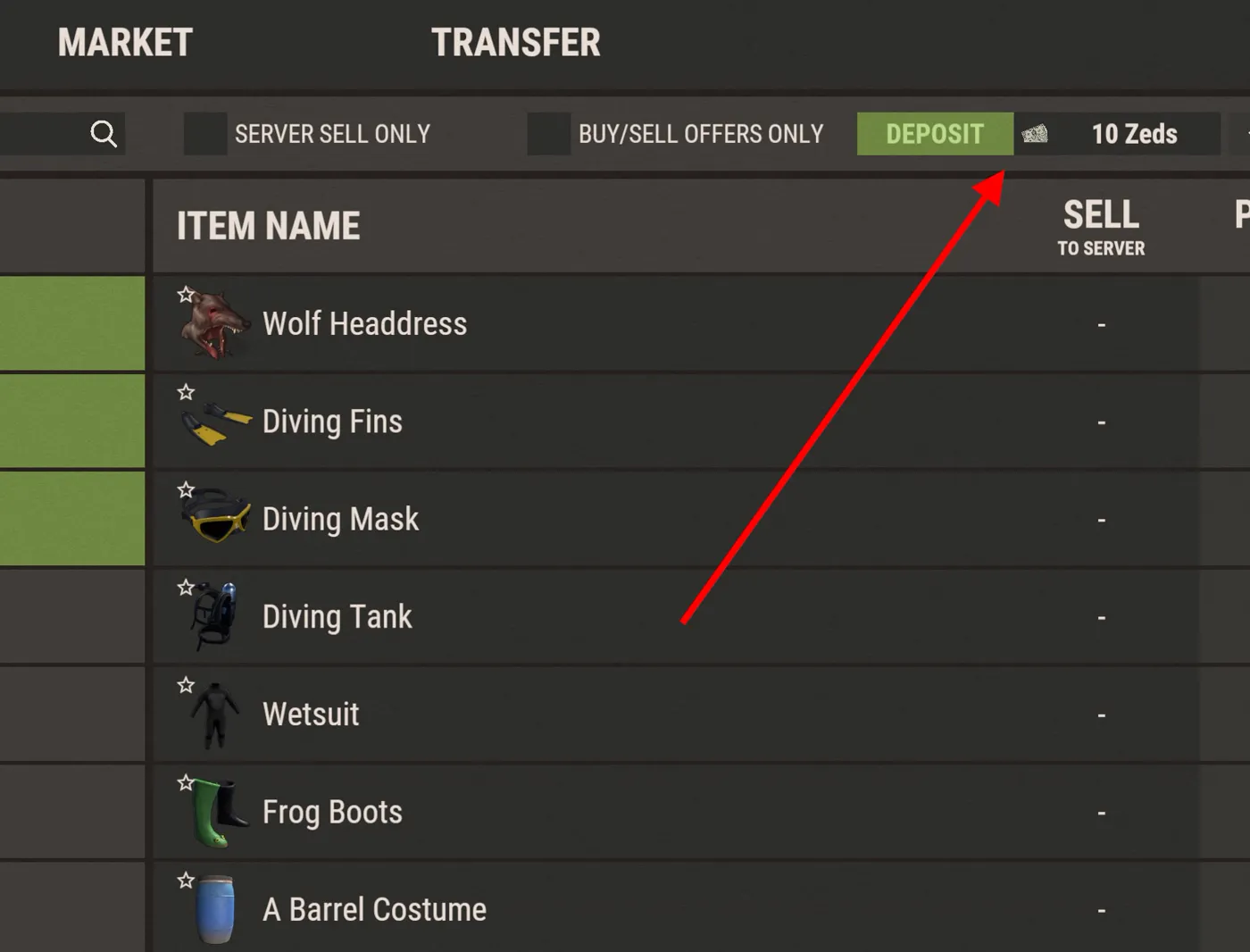
The currency needs to be residing in your account not your inventory. See the Shop & Market page for full details. Pick which market you wish to make a deposit in (meaning, which currency you are depositing) and then click "Deposit" at the top of that market window. Whatever currency amount you have in that account is what you use for spending.
Note: This is only for physical currencies and is not necessary for RP.
Where can I find the special items like resource exchange and a few others?
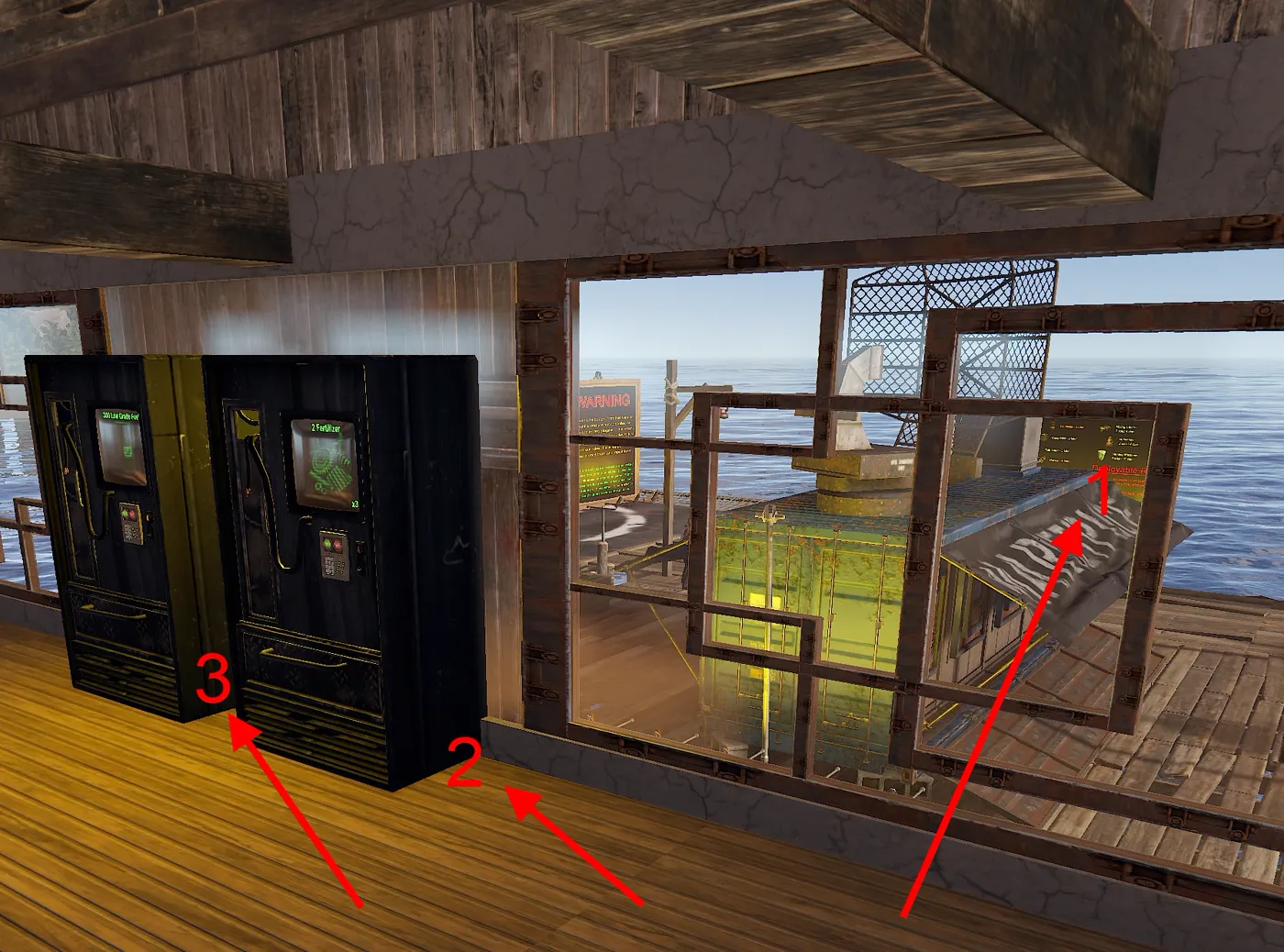
These are placed in traditional vending machines at town.
They cover the few things we could not implement into /s. The reason being is, shops operate off of a "currency". For those few things you see in the vending machines notice scrap is not the currency but each item has a different currency (stone, wood, frags, etc.). That would mean we'd need to make an entire shop section for EACH of those currencies. So we'd end up with 1 shop for metal frag currency that you can sell scrap to and nothing else, then another shop with wood as a currency and you can only sell stone to it, etc.
That seems very sloppy and an easier solution was just to put those few things in a classic vending machine at town. You can see an example of the location of these three vending machines below...
Why are there now a few vending machines in town?
They cover the few things we could not implement into /s. The reason being is, shops operate off of a "currency". For those few things you see in the vending machines notice scrap is not the currency but each item has a different currency (stone, wood, frags, etc.). That would mean we'd need to make an entire shop section for EACH of those currencies. So we'd end up with 1 shop for metal frag currency that you can sell scrap to and nothing else, then another shop with wood as a currency and you can only sell stone to it, etc.
That seems very sloppy and an easier solution was just to put those few things in a classic vending machine at town. You can see an example of the location of these three vending machines below...
How do I buy special items like eggs, recycler, or presents?
They are sold in the shop. Open /s and look under the RP shop.
Can I place a recycler in my base?
Yes. Buy a recycler from the shop — open /s and look under the RP shop — then place it in your base like any other deployable and use it there. You are not limited to the recyclers at monuments; the one you buy is yours to deploy wherever you build.
Changed your mind or want to move it? The Remover Tool works on a placed recycler, so you can pick it back up.
Map & Locations
Where is Town?
Town is located in different places depending on the map. It can be easily located by its map marker, or by using /warp and selecting Town as your destination.
Where is Bandit Camp?
Bandit Camp and Outpost are not physically on our custom maps. We save on usable terrain by keeping them digital inside our shop at /s. Some of the vending options are also contained in our Town.
Where is Outpost?
Bandit Camp and Outpost are not physically on our custom maps. We save on usable terrain by keeping them digital inside our shop at /s. Some of the vending options are also contained in our Town.
Raid Bases Full page ›
Can I get a refund for my buyraid since the server restarted?
Unfortunately this is not something we can assist you with. Our servers restart at the exact same time every day and always have (Outbreak and Infection at 5am and 5pm EST, all other servers at 5am EST only).
Not only is this the same every day, but we have constant reminders that scroll through chat, and increase in frequency as the restart time gets closer and closer.
If you bought a raid just before restart and realize your mistake, you can always /rbe despawn the raid as long as you have not damaged it yet. This will issue you a 75% refund on your RP and reset your timers. Much better deal than losing the entire raid.
Why am I locked out of my raid I just got back to?
Our raid bases have an idle time-out. If you do not actively raid the base for X minutes (currently set to 20 min) the base will revert to being public and you will have your lockout timers. Keep in mind this idle timer does not count just being in the bubble, but you actively damaging the base with explosive damage. If you stand around for 10 minutes sorting loot, then teleport home to deposit it for another 10 minutes, then return to the base … you most likely are too late. Also, going offline for a period of time will remove you from that base ownership.
Why did my raid base disappear I was not done?
Raid bases have two forms of completion: hitting all the loot containers or hitting the TC. Either of these will start the 5 minute countdown to the base despawn. If you would like to keep raiding then proceed to do so; each occurrence of explosive damage to the base will reset that 5 minute timer.
Why was the raid base TC empty?
The way raid bases generate loot is each difficulty has a set amount of "loot" it generates. So let's pretend that is '50 items' just for an example. We have an extensive loot table the plugin can draw loot from. Higher difficulties have better stuff in their table, of course. And some items (resources for example) have a min/max amount too. For example if the configured table has 1,000 to 10,000 stone, you could get anywhere in between those values but that stack of stone counts as one loot item.
So if a base is meant to have 50 pieces of loot, the plugin rolls the dice 50 times and picks an item from the loot tables for each random roll. Then the plugin auto sorts that loot distributing it evenly among all the boxes in the base. If any of the loot happens to be resources or anything that can go inside a TC, it will sort those into the TC of the raid base rather than a box.
But keep in mind, as said earlier, you may not even get "resources" from the random loot rolls. If that's the case then the TC would be empty (and might be better for you since that means more chances of random loot being boom or guns).
Higher difficulty bases of course have a much better chance of the TC not being empty since they generate a LOT more loot than lower tier bases do, which means more chances for that loot to be resources or something that can go inside a TC.
I died in a raid bubble but cannot find my bag now. Where is it?
Your bag did not glitch under the map or disappear. It simply got pushed outside of the "bubble". We do this on purpose to prevent players getting locked out of looting their own bag if someone else comes along and claims that raid base before you have a chance to get back to it.
Why did I not profit from this raid?
Raid loot is random; sometimes the rolls are less valuable. Profit depends on difficulty, what you spent on the raid, and RNG. If you have a specific situation (e.g. missing loot, despawn, or bug), open a support ticket with details.
Bases / Building
Why is my base gone?
There are only a set number of ways a base can "poof" on our server. They are listed below. There is literally no other way:
- AutoPurge
If you do not log on for a certain number of days it gets converted into an abandoned raid base. - Admin
These are all logged in admin discord. - Decay
Leaving the TC unlocked and someone steals the resources, or forgetting to put enough resources in. - Heli damage
- Bradley damage
- Twig
Twig can be destroyed by players. While against our rules it can still happen. - Cargo Ship
If built over water a player base can be hit by the cargo ship which completely deletes the base. - TC Connection
TCs only protect building pieces they are connected by foundations to. Many players think TCs have an area of effect. This is not the case. A base must be completely connected by foundations to the part of the base that contains the TC.
What are the upkeep rates of this server?
Facepunch offers two types of upkeep, both vanilla settings (not a plugin or customization): a flat rate or a tiered rate. We run flat upkeep on our 1x servers and the tiered system on our 3x servers. The tiered model is meant to keep building sizes under control, which matters most on 3x: those servers provide an extreme amount of resources and players cannot destroy your base, which can lead to overzealous builds that cause massive performance hits on other players as they try to render in your base.
On the tiered (3x) servers, as your base increases in size it can put you in a higher "tax bracket" so to speak. There are 4 brackets (these are made up numbers and not the actual configuration as we do not divulge our configs to the public):
Tier 1: 0-150 blocks
Tier 2: 151-300 blocks
Tier 3: 301-500 blocks
Tier 4: 501+ blocks
Each tier has a different "upkeep cost per piece". Again, this is still vanilla and not some plugin or customization. It is just one of two ways Facepunch programmed upkeep into this game, and is quite common on PVE or increased gather servers to help curb insane sizes of builds.
Why can I not remove things my teammate placed?
Unfortunately this is just the way the plugin has to be configured to prevent malicious players from removing your entire base.
Admins will not log in and remove things for you. If it is detrimental to game play (e.g. I cannot even get to our TC we hid it in honeycomb and I cannot remove the wall) we can get involved only if the player who owns the entity you want us to destroy puts in a support ticket themselves and requests us to do so. They would need to tell us which entity to destroy and where.
Otherwise we cannot assist you. It opens us up to a lot of liability destroying things based on another player's request. Get your friend to log in and take care of the removal.
Can zombie hordes destroy my base?
The short answer is, yes, mostly. See the Zombie Hordes page for the full breakdown. But we do have some safety measures in place so be sure to read further. We want Zombie Hordes to be scary and the ultimate vanilla Rust experience of "Out farming and some chad with an AK comes along and blasts you". The options are pretty limited in a PVE server on how best to recreate that terror.
So we developed raiding zombie hordes to help add to that terrifying moment when you are trying to hide in your base and hear the beep-beep of C4.
Instead of configuring what zombies could damage, we instead configure what they cannot damage. The TL;DR of that list is basically "things that normally contain loot". We did not want players to necessarily lose all of their stuff to hordes, we just wanted some destruction and punishment for trying to use your base to fight a horde.
Hordes can destroy everything you build or place except for the following:
- Wall (full square wall pieces)
- Wall (half wall)
- Floors
- Foundation
- Foundation (triangle)
- Tool Cupboard
- Mixing Table
- Research Table
- Repair Bench
- Wood box
- Planter Box
- Furnace (all types)
- Locker
- Composter
- Vending Machine
- Workbench (all types)
- Shelves
- Mining Quarry
Notes: The way Rust and PVE plugins handle damage requires damage to have an "owner". If a horde zombie throws a C4 and is killed before that C4 explodes, the explosion damage no longer has an "owner" and can then harm parts of your base that are supposed to be immune to Zombie Hordes. While this is technically a glitch, it is unfixable so is considered 'working as intended'. Using the above glitch in an attempt to harm another player's base, or using any glitch to do so, is considered griefing and a major violation of our rules that will result in a ban.
Web Store
How do I cancel/alter my subscription in the online store?
We offer two means of donating: one time, or subscription. Our server costs a ton of money to operate on a monthly basis, so we allow players to do a monthly donation to help support it. The moment you "proceed to payment" you are completely out of our control and in the hands of PayPal. Before that point our site forces you to read and accept our terms many times. We cannot cancel your subscriptions for you-that is a PayPal thing you must handle on your end. We have no way of making new charges or double charging you etc. We can only forward you on to PayPal and just pass along the amount you are donating, and whether you selected one time or monthly recurring. That's it. We cannot create / alter / cancel / delete any transactions. For security reasons PayPal does not allow 3rd party merchants like us to do such things.
So once more: we have zero capability of creating/altering/canceling/deleting/etc transactions. If you get "double charged" that means you added that package to your cart twice (it shows you the total before you proceed). If you have a recurring monthly donation that means you specifically clicked that option in our store. And on top of this, all of the perks we offer for your donation are delivered within minutes for which reason we do not offer refunds under any circumstances. It does not matter if you play Rust, if you get banned, or if a meteor crashes through your roof-we do not offer refunds and you are warned of this on every single page of our store. Anyone filing a chargeback against us will be automatically and permanently banned from all of our servers. No exceptions.
Death
I died and lost literally everything I had, can I get some of it spawned in?
The first question would be why was everything you had in your main inventory when you get a free full size backpack that does not drop on death except in PVP and that can be optionally expanded up to 4 additional full size backpacks that do not drop on death except in PVP-and additionally an optional second full size backpack that does not drop on death. And finally, you do have a base that cannot be looted by others.
All of that aside, the only time we can assist in corpse recovery is if the cause of death, and the cause of not being able to reach your items, is 100% at the fault of the map/plugins/server not working as intended. This does not mean just because our content (custom NPCs or monument) killed you that it is at fault. This means something completely not working as intended-e.g. a hole in the map terrain that sends you under the map and you die, or an elevator glitch (known Rust bug) that just suicides you.
If your bag has despawned, it is too late, even if it was not your fault that you died. Rust does not log anything. We cannot force it to log things. We have no idea what you had in your inventory once it despawns. If you were running one of the recording software options we link and you just happened to have accessed your inventory recently before the "glitch death" then we might be able to recover those items based on that evidence.
The best bet is to get a ticket in immediately so we can try to find your things before they despawn. If your bag is obtainable through normal gameplay (you just can't seem to find it) we can only tell you it is obtainable. We will not get it for you. If it truly is glitched we will retrieve it.
And ultimately the real best bet (since admins do need sleep too) is to just not carry everything in your main inventory in the first place. Zero reason to do this, ever.
How did I die offline and can I get my stuff returned?
First off, we are unable to refund items for offline deaths. Rust does not log or track anything, not even inventory or death. We have absolutely no way of finding out what you had on you or what you lost. Even if we did, dying to normal game play is not something we cover with returning items. And Rust itself allows for players to die while logged out.
There are numerous ways you can die offline. A common way is logging out in the wild-NPCs and animals can and will kill you. Another method would be logging out in a monument near loot spawns or safe zone. This is a core Rust mechanic and it will delete you upon log in, without dropping a bag. Just deleted completely.
Other more unique ways include someone fighting a patrol heli by your base and the napalm killing you. This is a rule violation; if someone snagged a video of it, the offender will be banned. You could also be sleeping too close to an open window or opening in your base and a wandering horde can aggro you (or even a Bradley if you live near a road). If the horde aggros you there is a high probability they will lob some grenades into your base and kill you.
Either way, it falls on the player to log out in a responsible area. All of the above scenarios are normal gameplay and working as intended-therefore we cannot refund lost items even if we had some means of identifying what was lost (which we have no means of doing).
Why do I die when I log off in Town?
We have an auto eject feature for our in-game "Town". Once per hour our server will eject all sleepers to the edge of that zone radius (whichever edge is closest to where you logged out). This will end up with you laying on the ground somewhere. Animals or zombies can wander by and kill you.
With the incredible amount of players we see per wipe (almost 2,000 per wipe) town can get incredibly crowded with players logging out. It had become a massive problem-piles of dozens of players all logged out in town which can cause client side lag for others and honestly just looks dumb. Furthermore it left a lot of invincible targets for PVP day since Town is a safe zone.
For those reasons we currently eject all sleepers from town. It is set to 1 hour intervals so that if you get disconnected temporarily you do not wind up dead by the time you log back in.
We advise all players to log out safely in their own base, away from exterior walls or windows (rogue patrol heli, or angry zombie horde can harm you).
How did I end up with negative RP / in debt?
You lose RP when you die, and that loss can push your balance below zero into the negative - yes, RP debt is a real thing. Different ways of dying cost different amounts, and suicide costs the most by far.
Nothing is broken when this happens. Just keep yourself alive and keep earning RP through normal gameplay and your balance will climb back out of the red.
Vehicles
How do I get a minicopter?
Why did my minicopter get destroyed while I was offline?
All /license vehicles (except for modular) have a configured amount of "idle minutes" before they auto /kill. This just despawns it so you can /spawn it again whenever you want.
Basically players were leaving horses and cars and minis all over the map, and we were getting flooded by constant tickets of "I keep finding XXXX and I cannot use it" because random players would find the vehicle and try to mount it. So we set all vehicles to auto /kill after being idle for too long to stop that clutter.
Then players complained that their horses kept auto /kill inside their base and they were not getting enough horse poop etc. So there is a global config option (meaning all vehicles or none) that says "Do not auto despawn if within player's TC radius" and that was set to TRUE so players would stop complaining about horse poop.
In a nutshell: if your vehicle is out in the wild, it will just auto put itself back in your pocket for use again later if you leave it sitting. If you have it in your base it will never auto despawn which means it slowly decays (we cannot stop that, it is a Rust function hence the auto despawn thing we do) and when it fully decays it blows up, thus destroying the vehicle.
My vehicle got stuck, can you move it?
Unfortunately there is nothing we can do to assist you. You will need to be more careful how you drive/fly your vehicle. The admin team does not have any special "move a vehicle" ability or tool. And if we did, it would still fall into your own hands as the action of getting it stuck was normal gameplay (despite how glitchy Rust physics are, that is not something we control or configure).
A pro tip we have seen work in the past is to get someone to spawn their "sedan" type vehicle nearby and try to push or crash your vehicle loose. We have seen it work numerous times. Otherwise you are just going to have to chalk it up as a loss and be more careful next time.
NPCs
What type of NPCs count as a scientist?
This is a common question due to the vast number of "scientist" phrases used in our skills system, enchantments, and quest descriptions.
The short but not completely accurate answer is: any humanoid type NPC that walks on two legs. But there are some slight exceptions.
In the earlier days there were Murderers, scientists (the guys in blue rad suits), and heavy scientists (oil rig, etc.). Eventually scarecrows were added too. With the introduction of scarecrows they started a new type of AI called HTN. And they also added other NPCs like underwater dwellers, subway dwellers, gingerbread men, etc.
It's honestly pretty hard for a player to have any indication of what Rust processes as a "scientist". Just the normal rad suit wearing scientists actually have about 17 different types behind the scenes. All in all there are at least 30 or so humanoid type NPCs in Rust that we are aware of.
For the most part it appears that all NPCs not using a melee weapon are considered scientists, at least when it comes to the code behind the scenes, and anything using a melee weapon is actually considered a scarecrow and might not count towards whatever skill or quest or enchantment you are asking about.
One final note: they can dynamically change! Our custom NPC plugin will actually switch NPC types on the fly so that it can switch weapons. If a custom NPC of ours is shooting at you with a ranged weapon, it is a scientist behind the scenes. If it switches to a melee weapon the plugin actually transforms it into a scarecrow (will still look normal to you) while he uses the melee weapon.
Why is my damage way off fighting some NPCs?
Some of our NPC profiles have a "maximum distance" setting configured into their profiles that prevents damage beyond a certain distance. This is for a number of reasons:
- Our NPCs are also configured to "diminish damage based on distance" meaning the further away from them you are, the less damage they deal. The trade off being that we do not want you to be able to snipe them from a distance so great that they are not capable of harming you in return.
- Some of our monuments are designed in a way that inadvertently allows players to cheese them by sniping off all the NPCs at a distance or from a vantage point that the AI just cannot fight back from.
Again, as with all things, there always has to be risk with reward. This configuration lets us keep that policy enabled.
Example: In the old days of Zombie Island, when we just had giant swarms of zombies that would respawn in mere seconds and would be worth a ton of RP and drop a ton of materials, players would sit at max range on a rowboat and just pick off zombies non stop. With a 3 second respawn it was like an ATM machine for RP. So "max distance" is a feature that allows us to say "OK, if you are 250m or more away, your damage to this NPC gets nullified". This prevents players from finding a camping spot far away where the NPCs could never return fire.
It only recently came into question because our damage report plugin that outputs your damage to chat could not communicate with the damage blocking feature. So you could unload a thousand rounds into an NPC and our damage output plugin only sees what you dish out-it does not know that the bot plugin prevented the damage because you were 400m away. So when the damage gets displayed in chat it could read some crazy high number.
Believe it or not this inaccuracy happens with a lot of things. If you have damage boosting skills or enchantments for example, the damage output to chat could have serious inaccuracies. There's no real way to avoid this without a massive reprogramming of numerous plugins. Not worth the trouble and is just a bug we will have to live with.
Why does the XP reward for killing NPCs seem incorrect?
XP rewards can appear wrong for several reasons: (1) Distance restrictions-if you are beyond the NPC's max distance, your damage (and sometimes XP) may be reduced or nullified. (2) Scientist vs. scarecrow classification-only certain NPC types count for scientist-related skills/quests. (3) The damage report in chat can show inflated numbers because it does not account for distance-based damage blocking. See the "Why is my damage way off fighting some NPCs?" and "What type of NPCs count as a scientist?" FAQs for more detail.
Can zombies or bots raid my base while I am offline?
No. Zombie hordes and NPCs cannot offline raid - they will not come after your base while you are logged off.
There is one thing to be aware of: if you have traps that damage zombies, those zombies will fight back against your traps even while you are offline. So a trap base can still end up in a scrap with a passing horde when you are not around. See the Zombie Hordes page for how horde raiding works.
Voting
Why does /vclaim say I have not voted?
This issue is most often caused when a user does not go through the complete voting process on that web site. Be sure you follow through with all the steps on the site. Sometimes it may appear completed but still require one more click. Ultimately there is nothing we can do though. We do not run that web site and cannot control if it gives the wrong response to our plugin. Our voting plugin just pings it asking if you have voted when you type the /vclaim command. The web site just answers yes or no; we cannot alter what it answers or manually override it as we do not own that site or have any ties to that site.
Why does the vote site say I voted today but I did not?
This is most often caused by people on the same IP address voting already. Those sites use IP to decide if you have voted already. An easy work around would be to go to the site on your cell phone (not on wifi) since that would be a different IP. That way more than one person in a household can vote.
Why do my in-game votes not match the website total?
The web site is completely out of our control and is operated by another party and tallies up its own vote counts based on how many times you go to that site and vote successfully. Our plugin tracks votes when you /vclaim them since we have to have some sort of action take place to tell the server to tally up another vote for you (the server cannot just tie into the web site on its own). That's where that total comes from. If you have less votes in game than you do on the web site it means you forgot to /vclaim.
Misc
Can you fix [Vanilla Monument] it seems glitched?
We do not support vanilla monument function or integrity in any way. Vanilla monuments, when placed on the map, are one giant prefab piece that we cannot edit, alter, or configure in any way.
This includes all vanilla monuments from supermarket, to oil rig, to Launch, etc. They are completely off limits to our admin abilities. Facepunch does not give us any method to edit or fix these monuments. They do glitch sometimes, usually in the player's favor. There is absolutely nothing we can do about it.
Why is my no-durability perk not working as it should?
This is a two part answer:
- Some items do not receive the normal "no-durability" perk obtained from the veteran role. That is because these items have their own specific durability reduction via skills. They include but are not limited to prim weapons, tools, etc.
- We turn off durability in certain situations to prevent it from being too overpowered and broken. Such situations include things like certain high end monuments, Zombie Island, and most PVP or raid situations. It would not be fair if a veteran could raid an entire base with just a jackhammer or run an entire monument with an explosive ammo SAR and never lose a single thing. This is intentional and is not going to change.
Why is the wipe length so short?
We frequently get asked by new players why our wipes are "so short". After almost half a decade of hosting Zombie Land and giving trial to all sorts of wipe schedules, we feel we have found the sweet spot. This is due to the fact that skills progress game play much faster than one would expect. In a typical wipe full of veteran players, the average person with a full time job and family is still hitting end game content by around day 3 to day 5. Newer players don't realize how fast they will progress and assume there is not enough time for them. We also provide a completely different custom map on every wipe.
Years ago we tested full month wipes. Actually our servers were first created on a monthly wipe schedule. It did not take long to realize how fast boredom can set in with PVE game play which is far easier than vanilla. Halfway through our month wipe players were so bored and desperate we had players that were pooling money together just to bribe us to wipe early. We of course did not take them up on the cash, but we did ultimately wipe early.
So with that we tried two week wipes instead. And this was before skills, meaning slower progression. Even then, by day 9 or 10 players were begging for us to wipe. By day 12 the servers were almost empty as everyone had done everything they could think of.
From there we switched to 9-12 day wipes (all depends on how the month is divided up). We have run that way for years now. And even still, the servers start to dwindle by about day 7.
We won't go any shorter, but we absolutely will not go longer. Our mission here is to keep our servers populated. Stretching out wipes does nothing but empty them out.
Why am I being required to provide an email address upon login?
I assure you I am not sharing your information or data with anyone. Lot of crazy people lately trying to rip us off here. I have worked for half a decade, day and night, on these servers. The trade off of me being willing to post so many details of our set up is that I am also going to force a few extra steps of trying to see that data because I am honestly sick of being back stabbed. Notice some of the lesser info is not hidden behind a login wall? Just the major stuff.
With your email address I can tie things together in order to ban someone from all my services (servers, discord, store, and website). It is only being collected as a way to pair up who you are across those places. Nothing more. The reason it only asks some of you for an email address is if your steam profile does not share it when you login via steam, it will manually ask you for it.
Please read this .... Privacy Policy
Can you explain "Verified" and "Linked"?
There is a lot of confusion about the differences between being "Verified" in our Discord and "Linked".
Verified is quite simply a "reaction role" in Discord. It serves no other purpose than forcing you to choose your primary server. If you do not have the verified role in Discord you are missing about 80% of the public areas that should be available to you. It is quite easy to verify, simply head on over to our 📌-server-info channel and click the blue button at the bottom to select your primary server. If you ever wish to change your primary server, just click a different button in that channel. If you do not have a server icon next to your name in Discord, you are not correctly verified and need to go select your primary server. (Note: Some roles, such as Nitro, will display their icon in place of a server icon.) The reason for this verified system is to have an identifier that tells us which server you play on to eliminate that extra step when trying to provide you with support.
Linked - The linked role is obtained by visiting ZombieLand.link. This site is nothing more than two publicly available login APIs. Steam and Discord. Once you have logged in with Steam and then with Discord, our site simply stores those two ID numbers together in an SQL database. This is so that our support system can instantly show us who you are in game and provide us with a link to your server profile which is where all of the valuable information we need is contained including log files filtered down to your specific situation. Having this information already available to us instantly when your ticket opens lets us provide exponentially faster support. This is why we require the linked role to submit a support ticket. This role is also required to attend our server meetings due to some extremely toxic trolls joining our meetings anonymously earlier this year. (Note: Some browsers report our link site as malicious. Most likely because it is a completely empty website that does nothing more than ask you to log in with two different credentials. There is not much we can do about that, but can assure you nothing malicious is being done.)
How does RNG work?
RNG stands for Random Number Generation. It's a method used in video games (and many other applications) to produce a sequence of numbers or outcomes that cannot be reasonably predicted better than by a random chance. It is the backbone of many game mechanics, determining everything from loot drops to critical hits.
The Basics of RNG - To explain how RNG works, imagine you have a 100-sided dice. Each time an event with a chance percentage is triggered, the game rolls this 100-sided dice to determine the outcome.
Example: 25% Chance - When the game needs to determine if an action happens, it rolls the 100-sided dice. If the result is 25 or lower (since 25% of 100 is 25), the action happens. If the result is 26 or higher, the action doesn't happen.
Common Misconceptions - One of the biggest misconceptions is the belief that a 25% chance means that the action will happen exactly once every four attempts. However, each roll of the dice is independent of the previous rolls. Independence of Events: Each roll is an independent event with the same 25% chance. The outcome of previous rolls does not affect future rolls. Variation in Results: Over a small number of attempts, you might see a significant variation.
Probability vs. Reality - While it's true that with a large enough number of trials, the actual outcomes tend to approximate the expected probability (i.e., closer to 25% for a 25% chance), smaller sample sizes can show significant deviations.
Visualizing RNG - To help visualize this, imagine flipping a coin. Although the probability of getting heads is 50%, it's entirely possible (though unlikely) to flip a coin 10 times and get heads every time. Similarly, with a 25% chance, you could theoretically see the action happen much more or much less frequently than 1 in 4 times over a short series of attempts.
Understanding RNG helps players set realistic expectations. Remember, probability is about the likelihood of an event occurring over a large number of trials, but in the short term, anything can happen.
Key Takeaways:
- Independent Rolls: Each roll or event is independent of the others.
- Probability Doesn't Guarantee: A 25% chance doesn't guarantee an action every 4 tries; it means each individual try has a 25% chance.
- Variability: Small sample sizes can have significant variations from the expected probability.
No questions matched your search.
Try a different word, or ask us directly in Discord.
Still stuck? Open a support ticket by sending a DM to Support Bot in our Discord, or ask in chat. Someone always knows.